
FM/AM/SAT radio with compact disc (CD) player (Type A) (if so equipped)
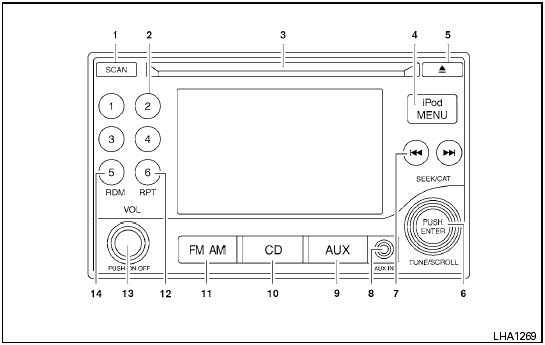
Type A
1. SCAN button
2. Station select (1 - 6) buttons
3. CD insert slot
4. iPod MENU button
5.  CD
eject button
6. TUNE/SCROLL knob/Setting control button
7. SEEK/CAT buttons
8. AUX IN jack
9. AUX button*
10. CD button
11. FM-AM button
12. RPT button
13. POWER/VOLUME control knob
14. RDM button
*No satellite radio reception is available when the AUX button is pressed to access satellite radio stations unless optional satellite receiver and antenna are installed and an XM satellite radio service subscription is active. Satellite radio is not available in Alaska, Hawaii and Guam.
For all operation precautions, see Audio operation precautions in this section.
See also:
Turn signal switch
1 Turn signal
Move the lever up or down to signal the turning
direction. When the turn is completed, the turn
signals cancel automatically.
2 Lane change signal
To indicate a lane change, mov ...
RearView monitor (if so equipped)
When the selector lever is shifted into the R
(Reverse) position, the monitor display shows
the view to the rear of the vehicle.
The system is designed as an aid to the driver in
detecting larg ...
“Phonebook” (phones with automatic
phonebook download function)
NOTE:
The “Transfer Entry” command is not available
when the vehicle is moving.
For phones that support automatic download of
the phonebook (PBAP Bluetooth profile), the
“Phonebook” com ...