
Connecting iPod
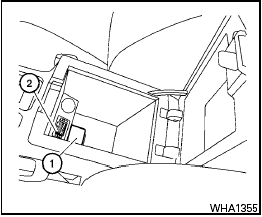
The iPod outlet connector is located on the center console. Your vehicle is equipped with the specialized cable for connecting the iPod to your vehicle audio unit. To connect the iPod , first open the protective cover from the connector in the center console 1 . Next, connect one end of the iPod cable to the iPod and the other end of the cable to the connector in the center console 2 . If compatible, the battery of your iPod is charged during the connection to the vehicle.
While connected to the vehicle, the iPod can only be operated by the vehicle audio controls.
To disconnect the cable from the vehicle outlet, fully depress the center connector button to unlatch the connector and pull the connector straight out of the outlet. To disconnect the cable from the iPod , fully depress the side connector buttons and pull the iPod connector straight out of the iPod .
* iPod is a trademark of Apple Inc., registered in the U.S. and other countries.
See also:
Making a call by entering a phone number
1. Push the button on steering
wheel. A
tone will sound.
2. Say: “Call” A . The system acknowledges
the command and announces the next set of
available commands.
3. Say: “Phone Numb ...
Off-road recovery
If the right side or left side wheels unintentionally
leave the road surface, maintain control of the
vehicle by following the procedure below. Please
note that this procedure is only a general ...
Locking with inside lock knob
Inside lock
To lock the door without the key, move the inside
lock knob to the lock position (1) , then close the
door.
To unlock the door without the key, move the
inside lock knob to the u ...