
CD care and cleaning
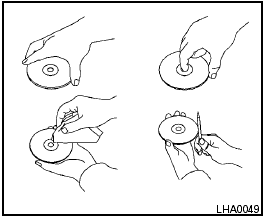
CD care and cleaning
● Handle a CD by its edges. Do not bend the disc. Never touch the surface of the disc.
● Always place the discs in the storage case when they are not being used.
● To clean a disc, wipe the surface from the center to the outer edge using a clean, soft cloth. Do not wipe the disc using a circular motion.
● Do not use a conventional record cleaner or alcohol intended for industrial use.
● A new disc may be rough on the inner and outer edges. Remove the rough edges by rubbing the inner and outer edges with the side of a pen or pencil as illustrated.
See also:
Engine coolant temperature gauge
Engine coolant temperature gauge
The gauge indicates the engine coolant temperature.
The engine coolant temperature is within the
normal range when the gauge needle points
within the zone show ...
Locking doors
Locking doors
1. Place the ignition switch in the LOCK position.
2. Close all doors.
3. Press the button on the
Intelligent
Key.
4. The hazard warning lights flash twice and
the horn beep ...
Under the Hood
The Pathfinder's 4.0-liter V-6 produces 270 horsepower and 291 pounds-feet of
torque. Operating with electronic throttle control, the V-6 features Continuous
Valve Timing Control. All Pathfinders ...