
Steering wheel switch for audio control (if so equipped)
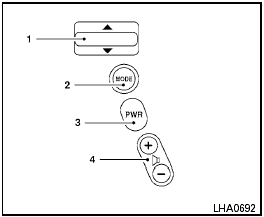
Type A
1. Tuning switch
2. MODE select switch
3. POWER on/off switch
4. Volume control switch
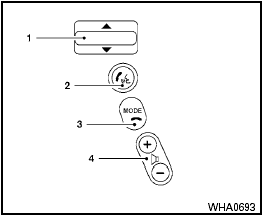
Type B
1. Tuning switch
2. Phone operation switch
3. POWER on and MODE select switch
4. Volume control switch
The audio system can be operated using the controls on the steering wheel.
See also:
Controls
Automatic control button
Push the AUTO button to activate the automatic
climate control system for the passenger compartment.
Fan control button
Push the button to manually
control the fan
sp ...
Precautions on cruise control
● If the cruise control system malfunctions, it
cancels automatically. The SET indicator
light in the instrument panel then blinks to
warn the driver.
● If the SET indicator light blin ...
Brake system
The brake system has two separate hydraulic
circuits. If one circuit malfunctions, you will still
have braking at 2 wheels. ...