
“Recent Calls”
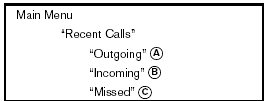
Use the Recent Calls command to access outgoing, incoming or missed calls.
“Outgoing” A
Use the Outgoing command to list the outgoing calls made from the vehicle.
“Incoming” B
Use the Incoming command to list the incoming calls made to the vehicle.
“Missed” C
Use the Missed command to list the calls made to the vehicle that were not answered.
See also:
Child safety
Children need adults to help protect them.
They need to be properly restrained.
In addition to the general information in this
manual, child safety information is available from
many other sourc ...
Vehicle identification number
(chassis number)
The vehicle identification number is located as
shown. ...
Going & Stopping
Base Altimas have a 2.5-liter four-cylinder engine that makes 175 horsepower
(170 hp in states that have adopted California's emissions rules). A 270-hp,
3.5-liter V-6 is optional. A six-speed man ...