
Troubleshooting guide
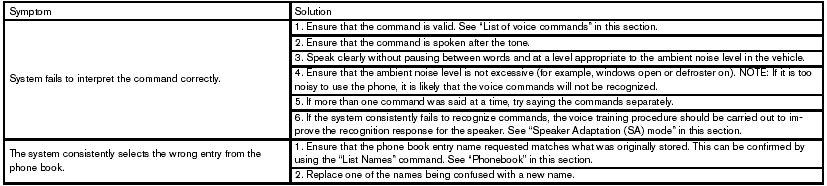
The system should respond correctly to all voice commands without difficulty. If problems are encountered, try the following solutions.
Where the solutions are listed by number, try each solution in turn, starting with number 1, until the problem is resolved.
See also:
Trailer towing tips
In order to gain skill and an understanding of the
vehicle’s behavior, you should practice turning,
stopping and backing up in an area which is free
from traffic. Steering stability, and braki ...
Front power seat adjustment
Operating tips:
- The seat motor has an auto-reset overload
protection circuit. If the motor stops during
operation, wait for a while, then reactivate
the switch.
- Do not operate the power se ...
Air conditioner specification label
The air conditioner specification label is affixed to
the underside of the hood as shown. ...