
Precautions on cruise control
Precautions on cruise control
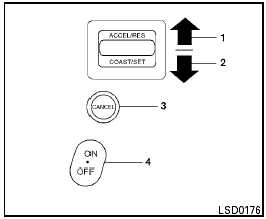
1. ACCEL/RES switch
2. COAST/SET switch
3. CANCEL switch
4. ON/OFF switch
● If the cruise control system malfunctions, it cancels automatically. The SET indicator light in the instrument panel then blinks to warn the driver.
● If the SET indicator light blinks, turn the cruise control switch off and have the system checked by a NISSAN dealer.
● The SET indicator light may blink when the cruise control switch is turned ON while pushing the ACCEL/RES, COAST/SET, or CANCEL switch. To properly set the cruise control system, use the following procedures.

Do not use the cruise control when driving under the following conditions.
● When it is not possible to keep the vehicle at a set speed.
● In heavy traffic or in traffic that varies in speed.
● On winding or hilly roads.
● On slippery roads (rain, snow, ice, etc.).
● In very windy areas.
Doing so could cause a loss of vehicle control and result in an accident.

On manual transmission models, do not shift into N (Neutral) without depressing the clutch pedal when the cruise control is set. Should this occur, depress the clutch pedal and turn the main switch off immediately.
Failure to do so may cause engine damage.
See also:
Dual Panel Moonroof (if so equipped)
The moonroof will only operate when the ignition
switch is in the ON position. The automatic
moonroof is operational for about 45 seconds,
even if the ignition switch is placed in the ACC or
...
Overview
The Altima is a mid-size car currently being manufactured by the Japanese
automaker Nissan, and is arguably a continuation of the "bloodline" that began
with the Nissan Bluebird in 1957. ...
Trunk light
The light illuminates when the trunk lid is opened.
When the trunk lid is closed, the light goes off.
The light will go off after about 15 minutes if the
trunk lid is left open, unless the ignition ...