
Exterior and interior lights
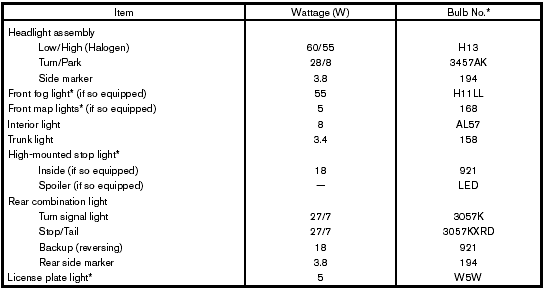
* Always check with the Parts Department at a NISSAN dealer for the latest parts information.
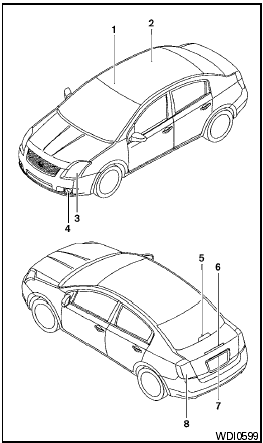
1. Front map lights (if so equipped)
2. Interior light
3. Headlight assembly
4. Front fog light (if so equipped)
5. High-mounted stop light (if so equipped)
6. Spoiler-mounted stop light (if so equipped)
7. License plate light
8. Rear combination light
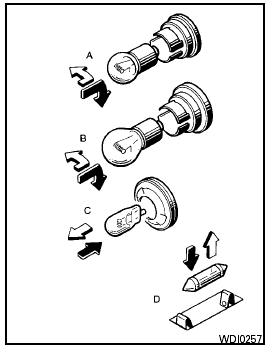
 Indicates
bulb removal
Indicates
bulb removal
 Indicates
bulb replacement
Indicates
bulb replacement
Replacement procedures
All other lights are either type A, B, C or D. When replacing a bulb, first remove the lens and/or cover.
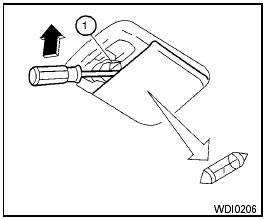
Interior light
Use a cloth 1 to protect the interior light housing.
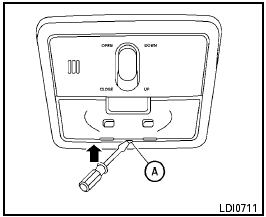
Map light (if so equipped)
Use a cloth A to protect the light housing.
See also:
Seat belt extenders
If, because of body size or driving position, it is
not possible to properly fit the lap/shoulder belt
and fasten it, an extender that is compatible with
the installed seat belts is available that ...
Capacities and recommended fuel/lubricants
The following are approximate capacities. The actual refill capacities may be
slightly different. When refilling, follow the procedure
described in the Maintenance and do-it-yourself section to de ...
Rear window wiper blade
Contact a NISSAN dealer if checking or
replacement is required. ...