
Front power seat adjustment
Operating tips:
- The seat motor has an auto-reset overload protection circuit. If the motor stops during operation, wait for a while, then reactivate the switch.
- Do not operate the power seat for a long period of time when the engine is off. This will discharge the battery.
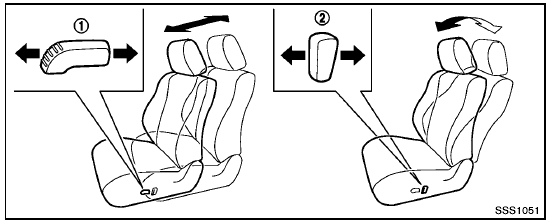
Forward and backward:
Moving the switch 1 forward or backward will slide the seat forward or backward to the desired position.
Reclining:
Move the recline switch 2 backward until the desired angle is obtained. To bring the seatback forward again, move the switch 2 forward.
The reclining feature allows adjustment of the seatback for occupants of different sizes for added comfort and to help obtain proper seat belt fit. (See “Precautions on seat belt usage” later in this section.) Also, the seatback can be reclined to allow occupants to rest when the vehicle is stopped and the transmission in the P (Park) position with the parking brake fully applied.
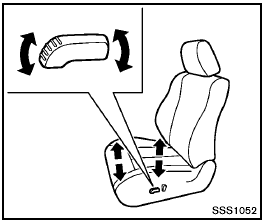
Seat lifter (if so equipped):
Pull up or push down the adjusting switch to adjust the height of the seat.
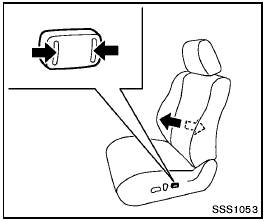
Lumbar support (if so equipped):
The lumbar support feature provides lower back support to the driver.
Push the front or back end of the switch to adjust the seat lumbar area.
See also:
Larger children
Children who are too large for child restraints
should be seated and restrained by the seat belts
which are provided. The seat belt may not fit
properly if the child is less than 4 ft 9 in (142. ...
Head restraints
WARNING
Head restraints supplement the other vehicle
safety systems. They may provide
additional protection against injury in certain
rear end collisions. Adjust the head
restraints properly, as ...
Trailer towing tips
In order to gain skill and an understanding of the
vehicle’s behavior, you should practice turning,
stopping and backing up in an area which is free
from traffic. Steering stability and brakin ...