
Rear seats
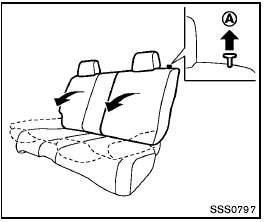
Folding
Before folding the rear seats:
- Secure the seat belts on the seat belt hooks on the side wall. (See “Seat belt hooks” later in this section.) - Release the connector tongue of the rear center seat belt from the buckle, and store the connector and seat belt tongues into the retractor base on the ceiling. (See “Rear center seat belt” later in this section.) - If necessary, move the front seats forward to provide enough clearance so that the rear seats can be folded down completely.
To fold down the seatback of each rear seat, pull the adjusting knob A .
To return the seatback to the seating position, lift up each seatback and push it to the upright position until it is latched.

- Do not use the rear seat belts when the buckles are stowed in the seat pockets. Failure to do so may reduce the effectiveness of the entire restraint system and increase the chance or severity of injury in an accident.
- Do not fold down the rear seats when occupants are in the rear seat area or any objects are on the rear seats.
- Never allow anyone to ride in the cargo area or on the rear seats when they are in the fold-down position. Use of these areas by passengers without proper restraints could result in serious injury in an accident or sudden stop.
- Properly secure all cargo with ropes or straps to help prevent it from sliding or shifting. Do not place cargo higher than the seatbacks. In a sudden stop or collision, unsecured cargo could cause personal injury.
- When returning the seatbacks to the upright position, be certain they are completely secured in the latched position. If they are not completely secured, passengers may be injured in an accident or sudden stop.
See also:
Engine compartment
Engine compartment ...
Octane rating tips
Using unleaded gasoline with an octane
rating lower than recommended can cause
persistent, heavy “spark knock.” (“Spark
knock” is a metallic rapping noise.) If severe,
this can lead to eng ...
Changing a flat tire
If you have a flat tire, follow the instructions below: ...