
Vehicle information display
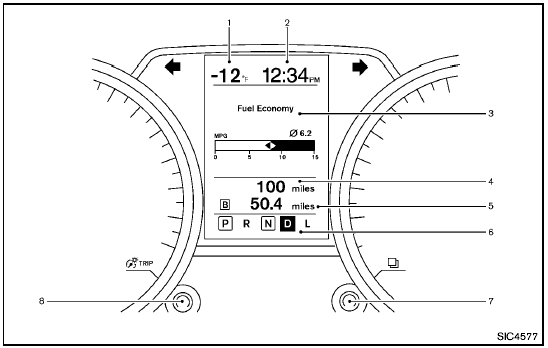
1. Outside temperature
2. Clock
3. Operation indicators and warnings
— Trip computer
— Cruise control
— Settings menu
— Intelligent Key operation*
4. Odometer
5. Twin trip odometer
6. Continuously Variable Transmission (CVT) position indicator
7. switch (settings control and trip computer control)
8. switch (twin trip odometer control and brightness control)
*: if so equipped
See also:
Maximum Gross Vehicle Weight (GVW)/maximum Gross Axle Weight (GAW)
The GVW of the towing vehicle must not exceed
the Gross Vehicle Weight Rating (GVWR)
shown on the F.M.V.S.S./C.M.V.S.S. certification
label. The GVW equals the combined weight of
the unloade ...
Automatic operation (AUTO)
The AUTO mode may be used all year around as
the system automatically controls constant
temperature, air flow distribution and fan speed.
To turn off the heater and air conditioner, turn the
fa ...
How to use the touch screen
CAUTION
● The glass display screen may break if it
is hit with a hard or sharp object. If the
glass screen breaks, do not touch it.
Doing so could result in an injury.
● To clean the ...