
Turn signal switch
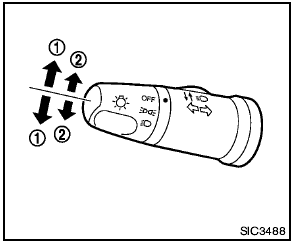
1 Turn signal
Move the lever up or down to signal the turning direction. When the turn is completed, the turn signals cancel automatically.
2 Lane change signal
To indicate a lane change, move the lever up or down to the point where lights begin flashing.
See also:
Loading tips
-The GVW must not exceed GVWR
or GAWR as specified on the
F.M.V.S.S./C.M.V.S.S. certification
label.
- Do not load the front and rear axle to
the GAWR. Doing so will exceed the
GVWR.
WARNI ...
Air conditioner button (if so equipped)
Air conditioner button (if so
equipped)
The button is provided only on vehicles equipped
with an air conditioner.
Start the engine, turn the fan control dial to the
desired position and push ...
Replacing
Replacing
Replace the wiper blades if they are worn.
1. Lift the wiper arm away from the windshield.
2 Push the release tab, then move the wiper
blade down the wiper arm to remove.
3 Remove th ...