
Glove box
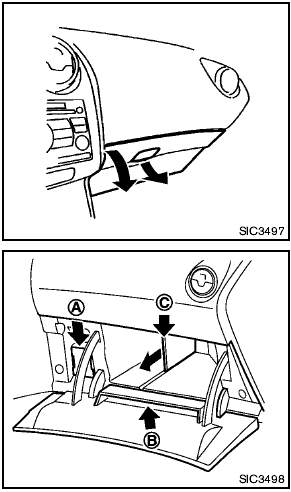
Glove box

Keep glove box lid closed while driving to help prevent injury in an accident or a sudden stop.
To open the glove box, pull the handle.
To close, push the lid in until the lock latches.
The glove box light illuminates when the headlight switch is turned on.
A Card holder
B Back side pocket of lid
C Removable partition (if so equipped)
To remove the partition, pull it out.
See also:
Releasing the trunk lid
Releasing the trunk lid
Press the button for longer than
0.5 seconds
to open the trunk lid. The trunk release
button will not operate when the ignition switch is
placed in the ON position. ...
Temperature
A temperature increase will accelerate the rate
of corrosion to those parts which are not well
ventilated. ...
Brake pad wear indicators
The disc brake pads have audible wear warnings.
When a brake pad requires replacement, it
will make a high pitched scraping sound when
the vehicle is in motion. This scraping sound will
first o ...