
Console box
Console box
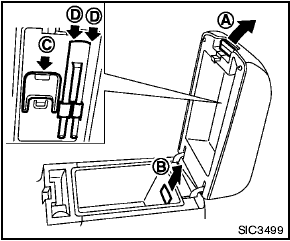
To open the console boxes, push up the knob A and pull up the lid.
To close, push the lid down until latched.
To remove the inner box (if so equipped) for cleaning or storing a large object, pull it up as illustrated B .
The inside of the console box lid is designed to be used as a card holder C and pen holders D .
See also:
Map pockets
Map pockets ...
Backing up near a projecting object
Backing up near a projecting object
The vehicle may seem to nearly clear the object
in the display. However, the vehicle may hit the
object if it projects over the actual backing up
course. ...
Spark plugs
Be sure the engine and ignition switch
are off and that the parking brake is
engaged securely.
Be sure to use the correct socket to
remove the spark plugs. An incorrect
socket can dam ...