
Main power window switch (driver’s side)
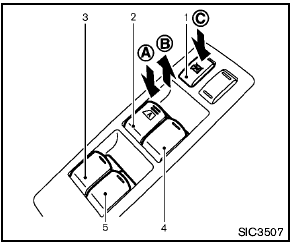
Main power window switch (driver’s side)
1. Window lock button
2. Driver side window
3. Rear left passenger side window
4. Front passenger side window
5. Rear right passenger side window
To open or close the window, push down A or pull up B the switch and hold it. The main switch (driver side switches) will open or close all the windows.
See also:
Moving closer to a projecting object
The position C is shown further than the
position B in the display. However, the
position C is actually at the same distance
as the position A . The vehicle may hit the
object when moving to ...
Nissan Intelligent Key™ door buzzer (if so equipped)
The Intelligent Key door buzzer sounds if any one
of the following improper operations is found.
● The ignition switch is not returned to the
LOCK position when locking the doors.
● ...
Cruise control operations
1. ACCEL/RES switch
2. COAST/SET switch
3. CANCEL switch
4. MAIN (ON·OFF) switch
The cruise control allows driving at a speed
between 25 to 89 MPH (40 to 144 km/h)
without keeping your f ...