
Intelligent Keys (if so equipped)
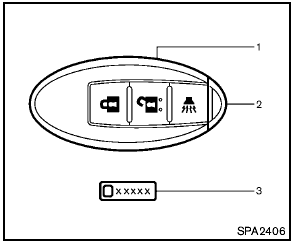
Intelligent Keys (if so equipped)
1. Intelligent Key (2)
2. Mechanical key (inside Intelligent Key) (2)
3. Key number plate (1)
Your vehicle can only be driven with the Intelligent Keys which are registered to your vehicle’s Intelligent Key system components and NISSAN Vehicle Immobilizer System components.
As many as 4 Intelligent Keys can be registered and used with one vehicle. The new keys must be registered by a NISSAN dealer prior to use with the Intelligent Key system and NISSAN Vehicle Immobilizer System of your vehicle. Since the registration process requires erasing all memory in the Intelligent Key components when registering new keys, be sure to take all Intelligent Keys that you have to the NISSAN dealer.

- Do not allow the Intelligent Key, which contains electrical components, to come into contact with water or salt water. This could affect the system function.
- Do not drop the Intelligent Key.
- Do not strike the Intelligent Key sharply against another object.
- If the outside temperature is below 148F (-108C) degrees, the battery of the intelligent key may not function properly.
- Do not place the Intelligent Key for an extended period in an area where temperatures exceed 1408F (608C).
- Do not attach the Intelligent Key with a key holder that contains a magnet.
- Do not place the Intelligent Key near equipment that produces a magnetic field, such as a TV, audio equipment and personal computers.
Mechanical key
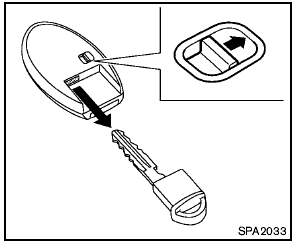
Mechanical key
To remove the mechanical key, release the lock knob at the back of the Intelligent Key.
To install the mechanical key, firmly insert it into the Intelligent Key until the lock knob returns to the lock position.
Use the mechanical key to lock or unlock the doors. (See “Doors” later in this section.)
Always carry the mechanical key installed in the Intelligent Key.
See also:
Interior
Nissan promises “first-class seating” on sculpted seats. Equipped with either
cloth or leather upholstery, the Murano has flip-out door pockets and a
removable cupholder. Adjustable pedals are ...
Trunk lid
● Do not drive with the trunk lid open. This
could allow dangerous exhaust gases
to be drawn into the vehicle. See “Exhaust
gas” in the “Starting and driving”
section of this ...
Instrument panel
Instrument panel
1. Side and center vents.
2. Headlight/fog light (if so equipped)/turn
signal switch.
3. Steering wheel switch for audio control
and Bluetooth Hands-Free Phone
System.
4. ...