
Backing up on a steep uphill
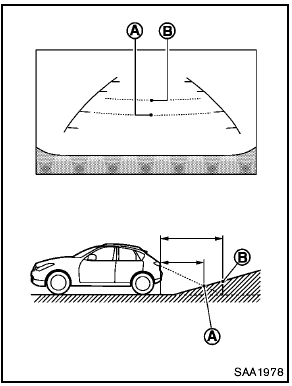
Backing up on a steep uphill
When backing up the vehicle up a hill, the distance guide lines and the vehicle width guide lines are shown closer than the actual distance.
For example, the display shows 3 ft (1.0 m) to the place A , but the actual 3 ft (1.0 m) distance on the hill is the place B . Note that any object on the hill is viewed in the monitor further than it appears.
See also:
Passenger compartment
Passenger compartment
1. Cargo cover*
2. Coat hooks
3. Ceiling light
4. Door armrest
— Power window switch
— Power door lock switch
5. Sun visors
6. Moonroof*
7. Front map light ...
Rear-facing child restraint installation using the seat belts
● The three-point seat belt with Automatic
Locking Retractor (ALR) must be
used when installing a child restraint.
Failure to use the ALR mode will result
in the child restraint not b ...
Maximum Gross Vehicle Weight (GVW)/Maximum Gross Axle Weight (GAW)
The GVW of the towing vehicle must not exceed
the Gross Vehicle Weight Rating (GVWR)
shown on the F.M.V.S.S./C.M.V.S.S. certification
label. The GVW equals the combined weight of
the unloade ...