
Backing up near a projecting object
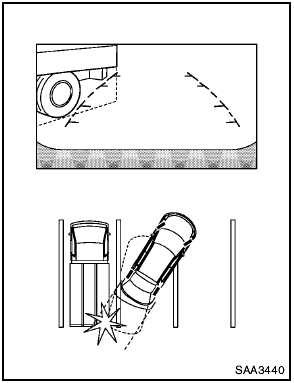
Backing up near a projecting object
The vehicle may seem to nearly clear the object in the display. However, the vehicle may hit the object if it projects over the actual backing up course.
See also:
Trailer towing tips
In order to gain skill and an understanding of the
vehicle’s behavior, you should practice turning,
stopping and backing up in an area which is free
from traffic. Steering stability, and braki ...
Tire Pressure Monitoring System (TPMS)
This vehicle is equipped with the Tire Pressure
Monitoring System (TPMS). It monitors tire pressure
of all tires except the spare. When the low
tire pressure warning light is lit, and the CHECK
TI ...
Handset Phonebook
Many phones will support an automatic download
of the cellular phones phonebook. Since
this method allows for up to 1000 numbers to be
stored and entries are automatically assigned
voice tags ...