
Backing up behind a projecting object
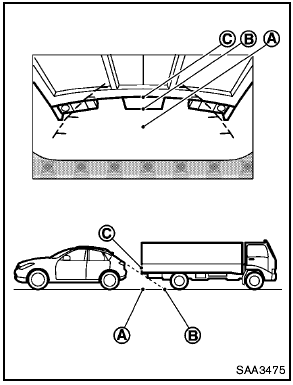
Backing up behind a projecting object
The position C is shown further than the position B in the display. However, the position C is actually at the same distance as the position A . The vehicle may hit the object when backing up to the position A if the object projects over the actual backing up course.
See also:
Anti-lock Braking System (ABS)
WARNING:
- The Anti-lock Braking System (ABS) is a
sophisticated device, but it cannot prevent
accidents resulting from careless
or dangerous driving techniques. It can
help maintain vehicle ...
OFF position
When the switch is in the OFF position 3 , the
ceiling light will not illuminate, regardless of the
condition. ...
Parking brake
- Be sure the parking brake is fully
released before driving. Failure to
do so can cause brake failure and
lead to an accident.
- Do not release the parking brake
from outside the vehicle ...