
Backing up on a steep downhill
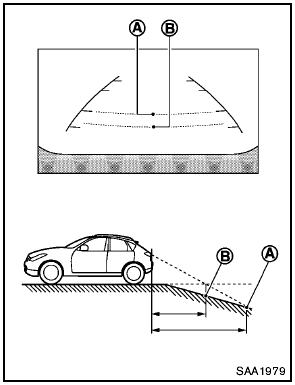
Backing up on a steep downhill
When backing up the vehicle down a hill, the distance guide lines and the vehicle width guide lines are shown further than the actual distance.
For example, the display shows 3 ft (1.0 m) to the place A , but the actual 3 ft (1.0 m) distance on the hill is the place B . Note that any object on the hill is viewed in the monitor closer than it appears.
See also:
California proposition 65 warning
Engine exhaust, some of its constituents,
and certain vehicle components
contain or emit chemicals known to the
State of California to cause cancer and
birth defects or other reproductive ...
Programming HomeLink®
To program your HomeLink® Transceiver to
operate a garage door, gate, or entry door
opener, home or office lighting, you need to be
at the same location as the device. Note:
Garage door opene ...
Seat belt warning chime
The seat belt warning chime will sound for about
6 seconds unless the driver’s seat belt is
securely fastened. ...