
Front-side view
Front-side view
Guiding lines:
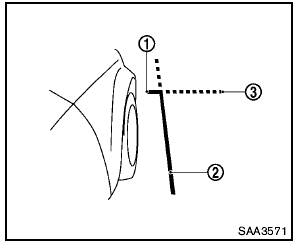
Guiding lines that indicate the width and the front end of the vehicle are displayed on the monitor.
The front-of-vehicle line 1 shows the front part of the vehicle.
The side-of-vehicle line 2 shows the vehicle width including the outside mirror.
The extensions 3 of both the front 1 and side 2 lines are shown with a green dotted line.

- There is a plastic cover over the camera. Do not scratch the cover when cleaning dirt or snow from the cover.
- The turn signal light may overlap with the side-of-vehicle line. This is not a malfunction.
See also:
Interior
Seven-passenger seating includes split, folding second- and third-row seats.
The front passenger seat also folds. The second-row seat is split 40/20/40 and
has a one-touch release lever for third- ...
Zone variation change procedure
Zone map
The difference between magnetic north and
geographical north is known as variance. In
some areas, this difference can sometimes be
great enough to cause false compass readings.
Foll ...
Fan control dial
The fan control dial turns the fan on and off, and
controls fan speed. ...