
Moving near a projecting object
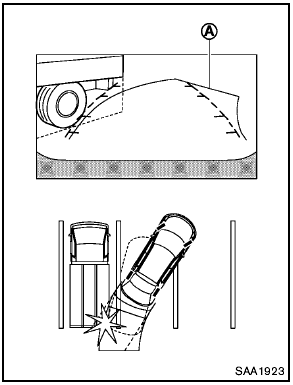
The predicted course lines A do not touch the object in the display. However, the vehicle may hit the object if it projects over the actual moving course.
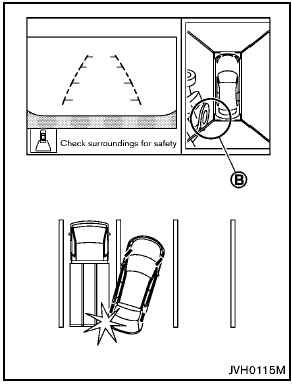
There may be a small distance visible between the vehicle and the object in the birdseye view on the display B .
See also:
Unlocking doors
1. Push the UNLOCK button 2 on
the
Intelligent Key.
2. The hazard indicator flashes once. The
driver’s door will unlock.
3. Push the UNLOCK button again
within
5 seconds.
4. The hazar ...
Booster seats
Precautions on booster seats
If a booster seat and seat belt are not used
properly, the risk of a child being injured
in a sudden stop or collision greatly
increases.
– Make sure the shoul ...
Meters and gauges
Meters and gauges
1. Tachometer
2. Vehicle information display
3. Speedometer
4. Warning/indicator lights
5. Engine coolant temperature gauge
6. switch (twin trip odometer
control and ...