
List of voice commands
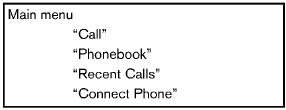
When you push and release the  button on
the steering wheel, you can choose from the
commands on the Main Menu. The following
pages describe these commands and the
commands in each sub-menu.
button on
the steering wheel, you can choose from the
commands on the Main Menu. The following
pages describe these commands and the
commands in each sub-menu.
Remember to wait for the tone before speaking.
You can say “Help” to hear the list of commands currently available anytime the system is waiting for a response.
A menu item can also be selected by scrolling
the display with the SEEK switch and entering
by pushing the button.
If you want to end an action without completing it, you can say “Cancel” or “Quit” at anytime the system is waiting for a response. The system will end the VR session. Whenever the VR session is cancelled, a double beep is played to indicate you have exited the system.
If you want to go back to the previous command, you can say “Go back” or “Correction” anytime the system is waiting for a response.
See also:
Tire chains
CAUTION
Only certain SAE class “S” tire chains can
be used on this vehicle. Using the wrong
Class “S” chains on this vehicle will cause
damage to the vehicle. If you plan to use
tire chai ...
Folding front passenger’s seat (if so equipped)
Folding front passenger’s seat (if so
equipped)
The front passenger’s seatback can be folded
down. Some long objects may be loaded in the
vehicle when the rear seats are also folded
dow ...
Fuel recommendation
NISSAN recommends the use of premium unleaded
gasoline with an octane rating of at least
91 AKI (Anti-Knock Index) number (Research
octane number 96). If unleaded premium gasoline
is not avail ...