
Phonebook (phones without automatic phonebook download function)
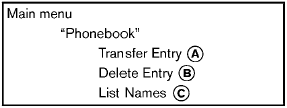
“Transfer Entry” A
Use the Transfer Entry command to store a new name in the system.
When prompted by the system, say the name you would like to give the new entry.
For example, say: “Mary.” If the name is too long or too short, the system tells you, then prompts you for a name again.
Also, if the name sounds too much like a name already stored, the system tells you, then prompts you for a name again.
The system will ask you to transfer a phone number stored in the cellular phone’s memory.
To enter a phone number by voice command:
For example, say: “five five five one two one
two.” See “How to say numbers” earlier in this
section for more information.
To transfer a phone number stored in the cellular
phone’s memory:
Say: “Transfer entry.” The system acknowledges
the command and asks you to initiate the
transfer from the phone handset. The new
contact phone number will be transferred from
the cellular phone via the Bluetooth® communication
link.
The transfer procedure varies according to each cellular phone. See the cellular phone Owner’s Manual for details. You can also visit www.
nissanusa.com/bluetooth for instructions on transferring phone numbers from NISSAN recommended cellular phones.
The system repeats the number and prompts you for the next command. When you have finished entering numbers or transferring an entry, choose “Store.”
The system confirms the name, location and number.
“Delete Entry” B
Use the Delete Entry command to delete one entry from the phonebook. After the system acknowledges a command, say the name to delete or say “List Names” to choose an entry.
“List Names” C
Use the List Names command to hear all the names in the phonebook. The system recites the phonebook entries but does not include the actual phone numbers. When playback of the list is complete, the system returns to the main menu.
Playback of the list can be stopped at any time
by pushing the  button on the steering
wheel. The system ends the VR session.
button on the steering
wheel. The system ends the VR session.
See also:
Vehicle Overview
Nissan added the Murano crossover sport utility vehicle to its lineup in
December 2002. Infiniti, Nissan’s luxury division, soon followed with its FX35
and FX45, two other crossover vehicles tha ...
Cleaning exterior
In order to maintain the appearance of your vehicle,
it is important to take proper care of it.
To protect the paint surfaces, please wash your
vehicle as soon as you can:
- after a rainfall to ...
Vehicle Dynamic Control (VDC) OFF switch
Vehicle Dynamic Control (VDC) OFF switch
The vehicle should be driven with the Vehicle
Dynamic Control (VDC) system on for most
driving conditions.
If the vehicle is stuck in mud or snow, the ...