
Troubleshooting guide
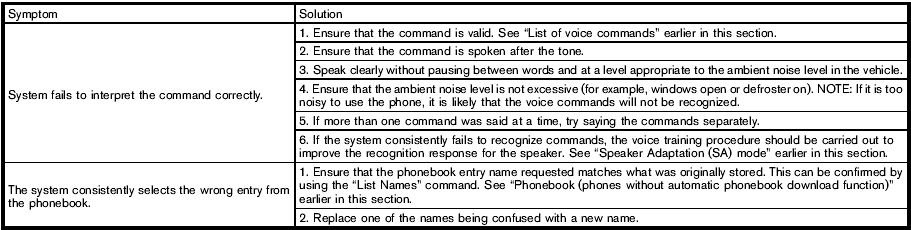
The system should respond correctly to all voice commands without difficulty. If problems are encountered, try the following solutions.
Where the solutions are listed by number, try each solution in turn, starting with number 1, until the problem is resolved.
See also:
Turn signal switch
Turn signal switch
Turn signal
1 Move the lever up or down to signal the
turning direction. When the turn is completed,
the turn signals cancel automatically.
Lane change signal
2 To signal ...
Difference between predicted and actual distances
The distance guide line and the vehicle width
guide line should be used as a reference only
when the vehicle is on a level, paved surface. The
distance viewed on the monitor is for reference
o ...
Releasing the trunk lid
Releasing the trunk lid
Press the button for longer than
0.5 seconds
to open the trunk lid. The trunk release
button will not operate when the ignition switch is
placed in the ON position. ...