
Intelligent Key system (if so equipped)
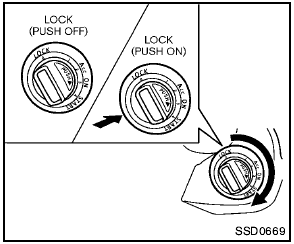
Intelligent Key system (if so equipped)
The Intelligent Key system can operate the ignition switch without taking the key out from your pocket or purse. The operating environment and/or conditions may affect the Intelligent Key system operation.

- Be sure to carry the Intelligent Key with you when operating the vehicle.
- Never leave the Intelligent Key inside the vehicle when you leave the vehicle.
- If the vehicle battery is discharged, the ignition switch cannot be moved from the LOCK position. Charge the battery as soon as possible. See “Jump starting” in the “6. In case of emergency” section.
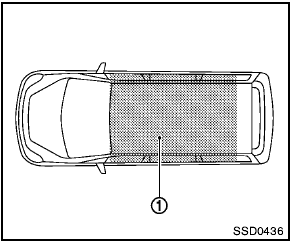
Operating range
The Intelligent Key functions can only be used for starting the engine when the Intelligent Key is within the specified operating range 1 .
When the Intelligent Key battery is almost discharged or strong radio waves are present near the operating location, the Intelligent Key system’s operating range becomes narrower and may not function properly.
If the Intelligent Key is within the operating range, it is possible for anyone, even someone who does not carry the Intelligent Key, to turn the ignition switch to start the engine.
- The cargo area is not included in the operating range, but the Intelligent Key may function.
- If the Intelligent Key is placed on the instrument panel, inside the glove box or door pocket, the Intelligent Key may not function.
- If the Intelligent Key is placed near the door or window outside the vehicle, the Intelligent Key may function.
Some indicators and warnings for operation are displayed on the vehicle information display between the speedometer and tachometer.
(See “Vehicle information display” in the “2.
Instruments and controls” section.)
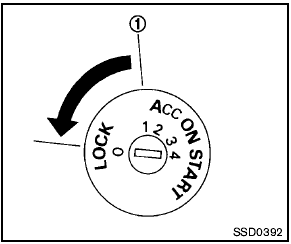
Without Intelligent Key system
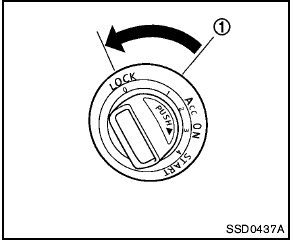
With Intelligent Key system
See also:
Control panel buttons — color screen with navigation
system (if so equipped)
Control panel buttons — color screen with navigation
system (if so equipped)
1. (brightness control) button
2. Display screen
3. MAP button*
4. NAV button*
5. TRAF button*
6. SETUP bu ...
Troubleshooting guide
The system should respond correctly to all voice commands without difficulty.
If problems are encountered, try the following solutions.
Where the solutions are listed by number, try each solution i ...
RearView Monitor (if so equipped)
When the shift selector is shifted into the R
(Reverse) position, the monitor display shows a
rearward view from the vehicle.
WARNING
● The system is designed as an aid to the
driver in det ...