
Passenger compartment
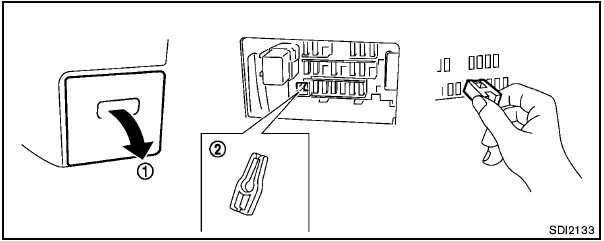

Never use a fuse of a higher or lower amperage rating than that specified on the fuse box cover. This could damage the electrical system or cause a fire.
If any electrical equipment does not operate, check for an open fuse.
1. Be sure the ignition switch and the headlight switch are turned off.
2. Pull to remove the fuse box cover 1 .
3. Remove the fuse with the fuse puller 2 .

4. If the fuse is open A , replace it with a new fuse B .
5. If a new fuse also opens, have the electrical system checked and repaired by a NISSAN dealer.
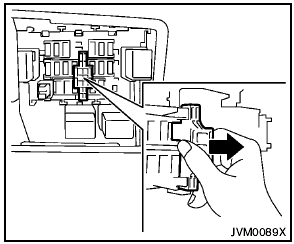
Extended storage switch (if so equipped)
If any electrical equipment does not operate, remove the extended storage switch and check for an open fuse.
NOTE:
If the extended storage switch malfunctions,
or if the fuse is open, it is not
necessary to replace the switch. In this
case, remove the extended storage switch
and replace it with a new fuse of the same
rating.
How to remove the extended storage switch:
1. To remove the extended storage switch, be sure the ignition switch is in the “OFF” or “LOCK” position.
2. Be sure the headlight switch is in the “OFF” position.
3. Remove the fuse box cover.
4. Pinch the storage switch and pull it in the direction illustrated.
See also:
Glove box
Glove box
Open the glove box by pulling the handle.
Keep glove box lid closed while driving to
help prevent injury in an accident or a
sudden stop. ...
Interior
When a car gets to be a few years old it usually looks dated next to
competitors that have been more recently redesigned. At roughly three model
years of age, the Maxima's cabin still seems up-to- ...
Engine compartment check locations
Engine compartment check locations
1. Power steering fluid reservoir.
2. Engine oil filler cap.
3. Brake fluid reservoir.
4. Air cleaner.
5. Fuse block.
6. Battery.
7. Fuse/Fusible link box.
...