
Vehicle identification number (chassis number)
Nissan Rogue / Nissan Rogue Owners Manual / Technical and consumer information / Vehicle identification / Vehicle identification number (chassis number)
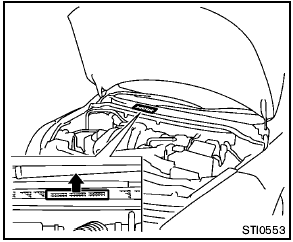
The vehicle identification number is located as shown.
Remove the cover to access the number.
See also:
Fail-safe
If the vehicle is driven under extreme conditions,
such as excessive wheel spinning
and subsequent hard braking, the fail-safe
system may be activated. The MIL may
come on to indicate the fail-saf ...
Changing engine coolant
A NISSAN dealer can change the engine coolant.
The service procedure can be found in the
NISSAN Service Manual.
Improper servicing can result in reduced
heater performance and engine overheating ...
Engine
This spark ignition system complies with the Canadian standard ICES-002. ...