
Instrument panel
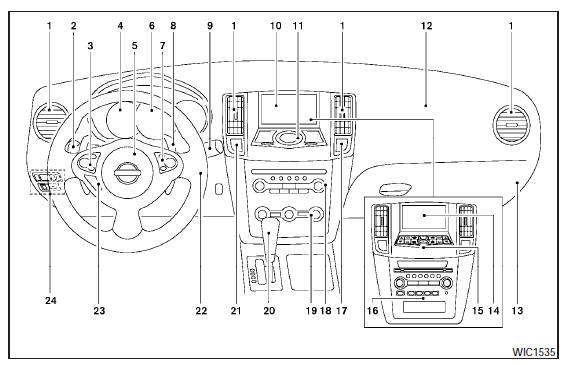
Instrument panel
1. Side and center vents.
2. Headlight/fog light (if so equipped)/turn signal switch.
3. Steering wheel switch for audio control and Bluetooth Hands-Free Phone System.
4. Meters and gauges.
5. Driver supplemental air bag/horn.
6. Security indicator light.
7. Cruise control main/set switches (P. 5-18) 8. Shift paddles (if so equipped).
9. Windshield wiper/washer switch.
10. Display screen/Navigation system* (if so equipped).
11. Display screen/Navigation system* controls (if so equipped).
12. Front passenger supplemental air bag.
13. Glove box.
14. Display screen (models without Navigation system).
15. Climate controls (models without Navigation system).
16. Audio system controls (models without Navigation system).
17. Passenger air bag status light.
18. Audio system controls.
19. Climate controls (models with Navigation system).
20. Shift selector.
21. Hazard warning flasher switch.
22. Ignition switch (behind the steering wheel).
23. Tilt/telescopic steering wheel controls (if so equipped).
24. Vehicle Dynamic Control (VDC) OFF switch Outside mirror controls.
Heated steering wheel switch (if so equipped).
Trunk lid release switch.
Rear control cancel switch (if so equipped).
* Refer to the separate Navigation System Owners Manual (if so equipped).
See the page number indicated in parentheses for operating details.
See also:
NISSAN Intelligent Key™ battery discharge
If the battery of the Intelligent Key is almost discharged,
the guide light A of the Intelligent Key
port blinks and the indicator appears on the vehicle
information display. See “Vehicle infor ...
Indicators for maintenance
1. Service due indicator
This indicator appears when the customer set
distance comes for service due, for example, for
engine oil and oil filter. You can set or reset the
distance for service ...
Seat belts
The seat belts can be cleaned by wiping them
with a sponge dampened in a mild soap solution.
Allow the belts to dry completely in the shade
before using them. See “Seat belt maintenance”
in th ...