
Instrument panel
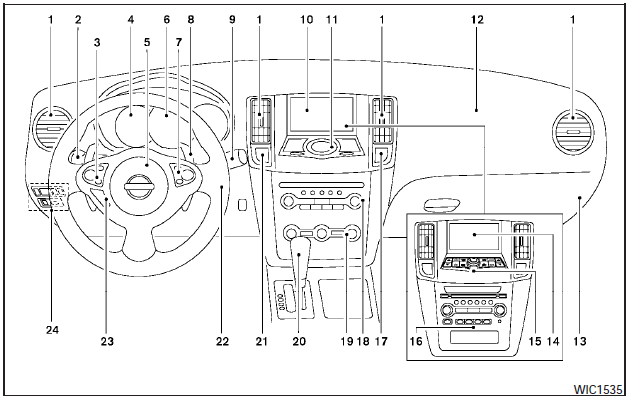
Instrument panel
1. Side and center vents.
2. Headlight/fog light (if so equipped)/turn signal switch.
3. Steering wheel switch for audio control and Bluetooth Hands-Free Phone System.
4. Meters and gauges.
5. Driver supplemental air bag/horn.
6. Security indicator light.
7. Cruise control main/set switches.
8. Shift paddles (if so equipped).
9. Windshield wiper/washer switch.
10. Display screen/Navigation system* (if so equipped).
11. Display screen/Navigation system* controls (if so equipped).
12. Front passenger supplemental air bag.
13. Glove box.
14. Display screen (models without Navigation system).
15. Climate controls (models without Navigation system).
16. Audio system controls (models without Navigation system).
17. Passenger air bag status light.
18. Audio system controls.
19. Climate controls (models with Navigation system).
20. Shift selector.
21. Hazard warning flasher switch.
22. Ignition switch (behind the steering wheel).
23. Tilt/telescopic steering wheel controls (if so equipped).
24. Vehicle Dynamic Control (VDC) OFF switch (P. 2-36) Outside mirror controls.
Heated steering wheel switch (if so equipped).
Trunk lid release switch.
Rear control cancel switch (if so equipped).
* Refer to the separate Navigation System Owners Manual (if so equipped).
See the page number indicated in parentheses for operating details.
See also:
Charge warning light
If this light comes on while the engine is running,
it may indicate the charging system is not functioning
properly. Turn the engine off and check
the generator belt. If the belt is loose, broken ...
Before starting the engine
● Make sure the area around the vehicle is
clear.
● Check fluid levels such as engine oil, coolant,
brake and clutch fluid (if so equipped),
and windshield-washer fluid as frequentl ...
New for 2012
There are no significant changes for 2012.
...