
Turn signal switch
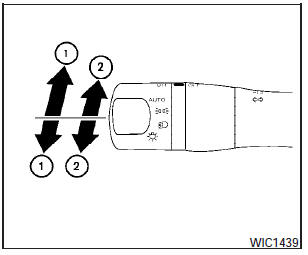
Turn signal
(1) Move the lever up or down to signal the turning direction. When the turn is completed, the turn signals cancel automatically.
Lane change signal
(2)- To signal a lane change, move the lever up or down to the point where the indicator light begins to flash, but the lever does not latch.
See also:
Vehicle Dynamic Control (VDC) OFF switch
The vehicle should be driven with the Vehicle
Dynamic Control (VDC) system on for most driving
conditions.
If the vehicle is stuck in mud or snow, the VDC
system reduces the engine output to ...
Window antenna
The antenna pattern is printed inside the rear
window.
CAUTION
● Do not place metalized film near the
rear window glass or attach any metal
parts to it. This may cause poor reception
or no ...
Auto-reverse function (if so equipped)
There are some small distances immediately
before the closed position which
cannot be detected. Make sure that all
passengers have their hands, etc., inside
the vehicle before closing the ...