
Troubleshooting guide
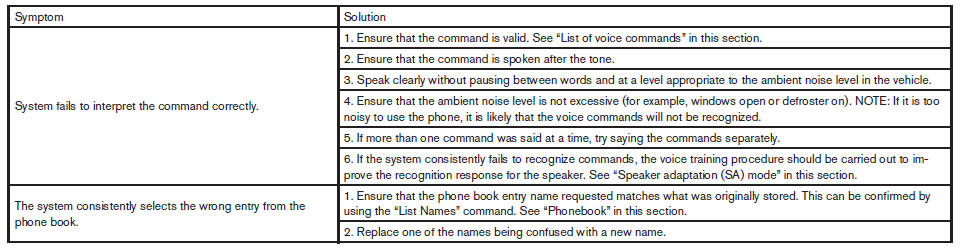
The system should respond correctly to all voice commands without difficulty. If problems are encountered, try the following solutions.
Where the solutions are listed by number, try each solution in turn, starting with number 1, until the problem is resolved.
See also:
Use of this product implies acceptance of the terms below
This device contains software from Gracenote,
Inc. of Emeryville, California (Gracenote). The
software from Gracenote (the Gracenote Software
) enables this application to do online disc
ident ...
Instrument panel
Instrument panel
1. Side and center vents.
2. Headlight/fog light (if so equipped)/turn
signal switch.
3. Steering wheel switch for audio control
and Bluetooth Hands-Free Phone
System.
4. ...
Replacing spark plugs
Replacing spark plugs
If replacement is required, see a NISSAN dealer
for servicing.
Iridium-tipped spark plugs
It is not necessary to replace the iridium-tipped
spark plugs as frequently as ...