
Receiving a call
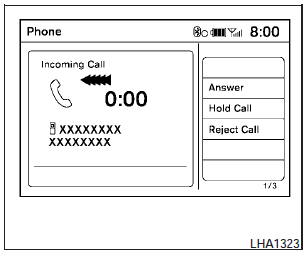
When you hear a phone ring, the display will change to phone mode. To receive a call, follow one of the procedures listed below.
a. Select the Answer key on the display.
b. Press the PHONE button on the instrument panel.
c. Press the phone  button on
the steering
wheel switches.
button on
the steering
wheel switches.
There are some options available when receiving a call. Select one of the following displayed on the screen.
Answer:
Accept an incoming call to talk.
Hold Call:
Put an incoming call on hold.
Reject Call:
Reject an incoming call.
To finish the call, follow one of the procedures listed below:
a. Select the Reject Call key on the display.
b. Press the PHONE button on the instrument panel.
c. Press and hold the phone
button on the
steering wheel switches.
See also:
How to use the SETUP button
How to use the SETUP button
When the SETUP button is pressed, the Setup
screen will appear on the display. You can select
and/or adjust several functions, features and
modes that are availabl ...
How to use brightness control and display ON/OFF
button
To change the display brightness, push the
button. Pushing the button again will change the
display to the day or the night display.
If no operation is performed within 5 seconds,
the display ...
Daytime running light system (Canada only)
The headlights automatically illuminate at a reduced
intensity when the engine is started with
the parking brake released. The daytime running
lights operate with the headlight switch in the
OFF p ...