
Troubleshooting guide
The system should respond correctly to all voice commands without difficulty. If problems are encountered, follow the solutions given in this guide for the appropriate error.
Where the solutions are listed by number, try each solution in turn, starting with number one, until the problem is resolved.
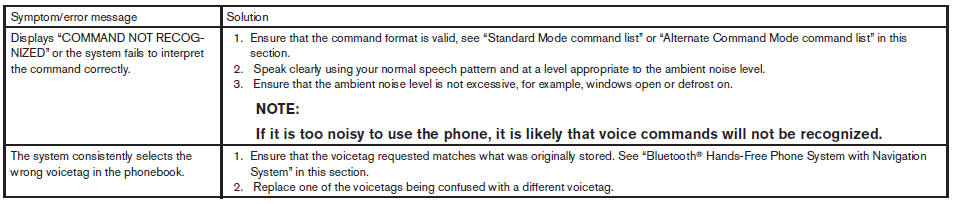 TROUBLESHOOTING GUIDE
See also:
Exterior front
Exterior front
1. Engine hood.
2. Windshield wiper and washer switch.
3. Windshield.
4. Moonroof (if so equipped).
5. Power windows.
6. Door locks, Nissan Intelligent Key,
keys, request butt ...
Wet brakes
When the vehicle is washed or driven through
water, the brakes may get wet. As a result, your
braking distance will be longer and the vehicle
may pull to one side during braking.
To dry the brakes ...
Audible reminders
Brake pad wear warning
The disc brake pads have audible wear warnings.
When a disc brake pad requires replacement, it
makes a high pitched scraping sound when the
vehicle is in motion, whether o ...