
Specifications. Dimensions and weights
Nissan Maxima / Nissan Maxima Owners Manual / Technical and consumer information / Specifications. Dimensions and weights
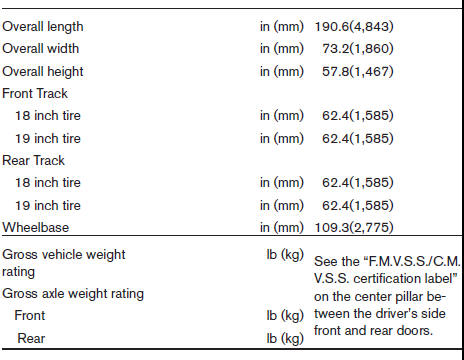
DIMENSIONS AND WEIGHTS
See also:
Event Data Recorders (EDR)
This vehicle is equipped with an Event Data Recorder
(EDR). The main purpose of an EDR is to
record, in certain crash or near crash-like situations,
such as an air bag deployment or hitting a
...
Vents
Center
Adjust air flow direction by moving the vent
slides.
Open or close the vents by using the dial. Move
the dial toward the to open
the vents or
toward the to close them.
Side
Re ...
Trunk lid release
Driver’s side
The trunk lid release is located on the floor to the
left of the driver’s seat. To open the trunk lid, pull
the trunk lid release.
To close the trunk lid, lower and push the ...