
Compass display (if so equipped)
This unit measures terrestrial magnetism and indicates
the direction of the vehicle’s heading.
With the ignition switch placed in the ON position,
press the  button as described in
the
chart below to activate various features of the
automatic anti-glare rearview mirror.
button as described in
the
chart below to activate various features of the
automatic anti-glare rearview mirror.
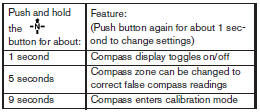
For information about the automatic anti-glare feature, refer to “Automatic anti-glare rearview mirror” in the “Pre-driving checks and adjustments” section.
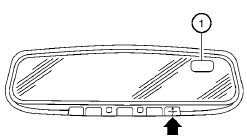
Press the button for about 1
second when
the ignition switch is placed in the ON position to
toggle the compass display 1 on or off. The
display will indicate the direction of the vehicle’s
heading.
N: North
E: East
S: South
W: West
If the display reads “C”, calibrate the compass by driving the vehicle in three complete circles at less than 5 MPH (8 km/h).
You can also calibrate the compass by driving your vehicle on your everyday route. The compass will be calibrated once it has tracked three complete circles.
See also:
Automatic door locks
● All doors lock automatically when the vehicle
speed reaches 15 MPH (24 km/h).
● All doors unlock automatically when the ignition
is placed in the OFF position.
The automatic unlock f ...
FM radio reception
Range: FM range is normally limited to 25 – 30 mi
(40 – 48 km), with monaural (single channel) FM
having slightly more range than stereo FM. External
influences may sometimes interfere with FM
...
Intelligent Key system (if so equipped)
- Radio waves could adversely affect
electric medical equipment. Those
who use a pacemaker should contact
the electric medical equipment
manufacturer for the possible influences
before u ...