
Lighting
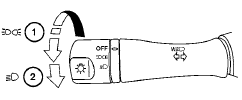
1 When turning the switch to the  position,
the front parking, tail, license plate and
instrument panel lights come on.
position,
the front parking, tail, license plate and
instrument panel lights come on.
2 When turning the switch to the  position,
the headlights come on and all the other
lights remain on.
position,
the headlights come on and all the other
lights remain on.
CAUTION
Use the headlights with the engine running to avoid discharging the vehicle battery.
See also:
Warning for low battery power
When the Intelligent Key battery is low, the Intelligent
Key system warning light (
) will blink
green for about 30 seconds after the ignition
switch is placed in the ON position. This warning ...
Handset phonebook
Many phones will support an automatic download
of the cellular phone’s phonebook. Since
this method allows for up to 1000 numbers to be
stored and entries are automatically assigned
voice tags b ...
Indicator lights
For additional information on warnings and indicators,
see “Vehicle information display” later in
this section. ...