
Headlight beam select
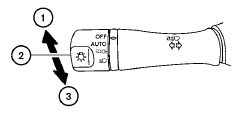
1 To select the high beam function, push the
lever forward. The high beam lights come on
and the  light illuminates.
2 Pull the lever back to select the low beam.
3 Pulling and releasing the lever flashes the headlight high beams on and off.
See also:
Comfort Levels
I remember finding our 2009 Cube 1.8 S' driver's seat rather uncomfortable.
The 2010's seemed better, though it doesn't appear to be different, aside from
the fabric. Another editor, who took the ...
Compact disc (CD) changer operation
Place the ignition switch in the ACC or ON
position and press the LOAD button, then press
one of the CD insert (1 6) slots. Insert the
compact disc into the slot with the label side
facing up. ...
Precautions on Supplemental Restraint System
This Supplemental Restraint System (SRS)
section contains important information concerning
the following systems:
- Driver and passenger supplemental frontimpact
air bag (NISSAN Advanced Air B ...