
Turn signal switch
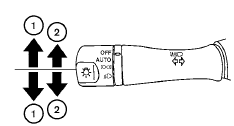
Turn signal
1 Move the lever up or down to signal the turning direction. When the turn is completed, the turn signals cancel automatically.
Lane change signal
2 To signal a lane change, move the lever up or down to the point where the indicator light begins to flash, but the lever does not latch.
See also:
Uniform tire quality grading
DOT (Department Of Transportation) Quality
Grades: All passenger car tires must conform to
federal safety requirements in addition to these
grades.
Quality grades can be found where applicable ...
Audio main operation
AUX button:
Place the ignition switch in the ACC or ON
position and press the AUX button repeatedly
until the iPod mode is displayed on the screen.
If another audio source is playing and the iPo ...
How to use the SETTING button
When the SETTING button is pressed, the Settings
screen will appear on the display. You can
select and/or adjust several functions, features
and modes that are available for your vehicle. Use ...