
Fog light switch (if so equipped)
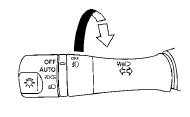
To turn the fog lights on, turn the headlight switch to the position, then turn the fog light switch to the position.
To turn the fog lights on with the headlight switch in the AUTO position (if so equipped), the headlights must be on, then turn the fog light switch to the position.
To turn the fog lights off, turn the fog light switch to the OFF position.
The headlights must be on and the low beams selected for the fog lights to operate. The fog lights automatically turn off when the high beam headlights are selected.
See also:
CD, DVD or USB with Compressed
Audio Files (models with Navigation
System)
The file types supported by this system are MP3,
WMA, AAC/M4A and ATRAC3.
Explanation of terms:
● MP3 — MP3 is short for Moving Pictures
Experts Group Audio Layer 3. MP3 is the
most well ...
Giving voice command
To operate NISSAN Voice Recognition, push
and release the button located on
the
steering wheel. After the tone sounds, speak a
command.
The command given is picked up by the
microphone, an ...
USB interface (models with Navigation System)
Connecting a device to the USB input
jack
The USB input jack is located in the center console.
Open the protective cover (1) on the USB
jack, then insert the USB device into the jack.
When a ...