
Glove box
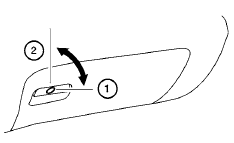
Open the glove box by pulling the handle. Use the master key when locking 1 or unlocking 2 the glove box.
WARNING
Keep glove box lid closed while driving to help prevent injury in an accident or a sudden stop.
See also:
Removing bolt-on wheel cover (if so equipped)
Removing bolt-on wheel cover (if so equipped)
Do not use your hands to pry off wheel
caps or wheel covers. Doing so could result
in personal injury.
Wheel cover attachment to the wheel is ...
Backing up behind a projecting object
Backing up behind a projecting object
The position is shown farther than the position
B in the display. However, the position C is
actually at the same distance as the position A .
The vehicle ...
Monitor, climate, audio, phone and voice recognition systems
WARNING
● Positioning of the heating or air conditioning
controls and display controls
should not be done while driving in order
that full attention may be given to
the driving operation.
...