
Covered storage box
Nissan Altima / Nissan Altima Owners Manual / Instruments and controls / Storage / Covered storage box
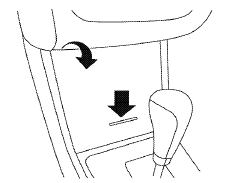
Push the center of the lid to open.
See also:
Seat belt maintenance
● To clean the seat belt webbing, apply a
mild soap solution or any solution recommended
for cleaning upholstery or carpet.
Then wipe with a cloth and allow the seat belts
to dry in the s ...
Rear window wiper and washer switch
In freezing temperatures the washer
solution may freeze on the rear window
glass and obscure your vision. Warm
the rear window with the defroster
before you wash the rear window.
- Do ...
Automatic door locks
● All doors lock automatically when the vehicle
speed reaches 15 MPH (24 km/h).
● All doors unlock automatically when the ignition
is placed in the OFF position (models
with Intelli ...