
Cargo net (if so equipped)
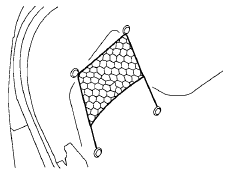
WARNING
Properly secure all cargo with ropes or straps to help prevent it from sliding or shifting. In a sudden stop or collision, unsecured cargo could cause personal injury.
The cargo net helps keep packages in the cargo area from moving around while the vehicle is in motion.
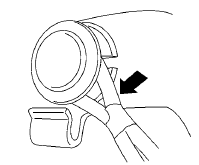
To install the cargo net, attach the net to the retainers.
To remove the cargo net, detach the net from the cargo net retainers.
See also:
Horn
To sound the horn, push near the horn icon of the
steering wheel.
WARNING
Do not disassemble the horn. Doing so
could affect proper operation of the
supplemental front air bag system. Tampering ...
Tire inflation pressure
Check the tire pressures (including the
spare) often and always prior to long distance
trips. The recommended tire pressure
specifications are shown on the
F.M.V.S.S./C.M.V.S.S. certification labe ...
Cleaning exterior
In order to maintain the appearance of your vehicle,
it is important to take proper care of it.
To protect the paint surfaces, please wash your
vehicle as soon as you can:
- after a rainfall to ...