
Mechanical key
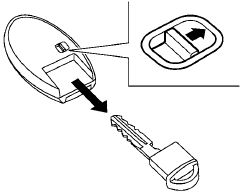
The Intelligent Key contains the mechanical key. To remove the mechanical key, release the lock knob on the back of the Intelligent Key.
To install the mechanical key, firmly insert it into the Intelligent Key until the lock knob returns to the lock position.
Use the mechanical key to lock or unlock the doors, trunk lid, glove box and rear seatback lock. See “Doors” and “Trunk lid” in this section, “Storage” in the “Instruments and controls” section, “Seats” in the “Safety — Seats, seat belts and supplemental restraint system” section, and “Upper tether anchor/key cylinder covers” in the “Maintenance and do-it-yourself” section of this manual.
CAUTION
Always carry the mechanical key installed in the Intelligent Key slot.
See also:
Automatic air conditioner
1. Air flow control dial
2. Temperature control dial
3. Fan speed control dial
4. Rear window defroster button (See “Rear window and outside mirror defroster
switch” in the “2. Instrum ...
Terms
It is important to familiarize yourself with
the following terms before loading your
vehicle.
● Curb Weight (actual weight of your
vehicle) - vehicle weight including.
standard and optio ...
Window washer fluid reservoir
Fill the window washer fluid reservoir periodically.
Add window washer fluid when the low window
washer fluid warning light comes on.
To fill the window washer fluid reservoir, lift the
cap of ...