
Door locks/unlocks precaution
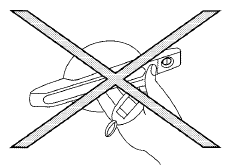
● Do not push the door handle request switch with the Intelligent Key held in your hand as illustrated. The close distance to the door handle will cause the Intelligent Key system to have difficulty recognizing that the Intelligent Key is outside the vehicle.
● After locking with the door handle request switch, verify the doors are securely locked by testing them.
● To prevent the Intelligent Key from being left inside the vehicle, make sure you carry the Intelligent Key with you and then lock the doors.
● Do not pull the door handle before pushing the door handle request switch. The door will be unlocked but will not open. Release the door handle once and pull it again to open the door.
See also:
Driving Impressions
The Pathfinder is a mighty smooth operator. Not only is Nissan’s SUV a true
pleasure to drive and ride in, but it also delivers plenty of performance. The
ride quality reaches close to gentle, a ...
Important information about this manual
You will see various symbols in this manual. They
are used in the following ways:
This is used to indicate the presence of
a hazard that could cause death or
serious personal injury. To avo ...
Vehicle identification number (chassis number)
The vehicle identification number is located as
shown. ...