
Locking doors
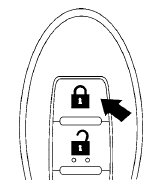
1. Place the ignition switch in the LOCK position.
2. Close all doors.
3. Press the  button on the
Intelligent
Key.
button on the
Intelligent
Key.
4. The hazard warning lights flash twice and
the horn beeps once.
5. All doors will be locked.
CAUTION
After locking the doors using the Intelligent Key, be sure that the doors have been securely locked by operating the door handles.
See also:
The Inside
Even though its swoopy styling might suggest limited cabin space, the
five-seat Altima has sufficient room in both the front and rear seats. The
optional leather front bucket seats are comfortable ...
Turn signal switch
Turn signal switch
Turn signal
1 Move the lever up or down to signal the
turning direction. When the turn is completed,
the turn signals cancel automatically.
Lane change signal
2 To signal ...
Precautions on cruise control
Precautions on cruise control
1. ACCEL/RES switch
2. COAST/SET switch
3. CANCEL switch
4. ON/OFF switch
● If the cruise control system malfunctions, it
cancels automatically. The SE ...