
Unlocking doors
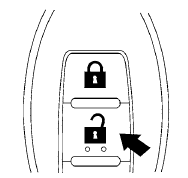
1. Press the  button on the
Intelligent
Key.
button on the
Intelligent
Key.
2. The hazard warning lights flash once.
3. Press the button again within 5
seconds
to unlock all doors.
All doors will be locked automatically unless one
of the following operations is performed within 1
minute after pressing the button:
● Opening any doors.
● Pushing the ignition switch.
The interior light illuminates for 15 seconds when a door is unlocked and the room light switch is in the DOOR position.
The light can be turned off without waiting for 15 seconds by performing one of the following operations:
● Placing the ignition switch in the ON position.
● Locking the doors with the Intelligent Key.
● Switching the room light switch to the OFF
position.
See also:
Safety
Two notable safety improvements for 2010 include side curtain airbags as
standard equipment on all four- and six-cylinder models, and a standard
electronic stability system on all V-6 models. The ...
How to use the STATUS button
The STATUS button is used to display system
information. Three different split screens of information
are available. Press the STATUS button
multiple times to cycle through these screens as
fo ...
Loose Fuel Cap warning message
Loose Fuel Cap warning message
The LOOSE FUEL CAP warning message displays
in the odometer when the fuel-filler cap is
not tightened correctly after the vehicle has been
refueled. It may take ...