
Releasing the trunk lid
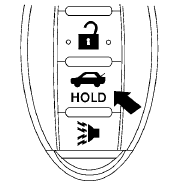
Press the  button for longer than
0.5 seconds
to open the trunk lid. The trunk release
button will not operate when the ignition switch is
in the ON position or when the trunk cancel
switch is in the OFF position. See “Cancel
switch” in this section.
button for longer than
0.5 seconds
to open the trunk lid. The trunk release
button will not operate when the ignition switch is
in the ON position or when the trunk cancel
switch is in the OFF position. See “Cancel
switch” in this section.
See also:
Outside air temperature
The outside air temperature is displayed in 8F or
8C in the range of −58 to 1408F (−50 to 608C).
The outside air temperature mode includes low
temperature warning features.
- When th ...
Capacities and recommended fuel/lubricants
The following are approximate capacities. The actual refill capacities may be
slightly different. When refilling, follow the procedure
described in the “Maintenance and do-it-yourself” section ...
Brake fluid
Check the brake fluid level in the reservoir. If the
fluid level is below the MIN line or the brake
warning light comes on, add Genuine NISSAN
Super Heavy Duty Brake Fluid or equivalent DOT
3 fl ...