
Using the panic alarm
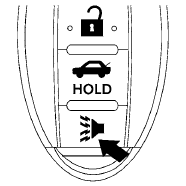
If you are near your vehicle and feel threatened,
you may activate the panic alarm to call attention
by pressing and holding the  button
on the
Intelligent Key for longer than 0.5 seconds.
button
on the
Intelligent Key for longer than 0.5 seconds.
The panic alarm and headlights will stay on for 25 seconds.
The panic alarm stops when:
● It has run for 25 seconds, or
● Any button is pressed on the Intelligent Key.
● Pushing the request switch on the driver or
passenger door with the Intelligent Key in
range of the door handle.
See also:
Overview
Europe's best selling pick-up and its SUV sibling since its launch - the
Nissan Navara and Nissan Pathfinder - have been given a mid-term boost with a
number of significant enhancements designed t ...
Outside air temperature
The outside air temperature is displayed in 8F or
8C in the range of −58 to 1408F (−50 to 608C).
The outside air temperature mode includes low
temperature warning features.
- When th ...
All season tires
NISSAN specifies all season tires on some
models to provide good performance all year,
including snowy and icy road conditions. All
Season tires are identified by ALL SEASON
and/or M&S (Mu ...