
Locking doors
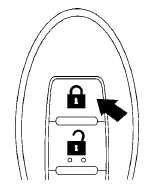
1. Place the ignition switch in the LOCK position.
2. Close all doors.
3. Press the  button on the
Intelligent
Key.
button on the
Intelligent
Key.
4. The hazard warning lights flash twice and
the horn beeps once.
5. All doors will be locked.
CAUTION
After locking the doors using the Intelligent Key, be sure that the doors have been securely locked by operating the door handles.
See also:
Vehicle Dynamic Control (VDC) system (if so
equipped)
The Vehicle Dynamic Control (VDC) system uses
various sensors to monitor driver inputs and vehicle
motion. Under certain driving conditions,
the VDC System helps to perform the following
funct ...
Seats
WARNING
● Do not ride in a moving vehicle when
the seatback is reclined. This can be
dangerous. The shoulder belt will not
be against your body. In an accident,
you could be thrown into ...
Sunglasses holder
Sunglasses holder
Keep the sunglasses holder closed
while driving to prevent an accident.
To open the sunglasses holder, push 1 .
- Do not use for anything other than
glasses.
- Do n ...